ReviewsReview

5 min readNew

It turns one finished logo into a full, neatly named client package in minutes. What it exports, who earns the price back, and what Illustrator already does for free.
This article contains an affiliate link: if you buy through it, AS Online earns a 10% commission at no extra cost to you.
Logo Package Express 3 is an Adobe Illustrator extension that takes a finished logo and exports every version a client might ask for: colour schemes, colour modes, file formats and lockups, all neatly named and sorted into folders. It costs $149, about £114 in the UK when we checked, which is a lot for a beginner and very little for a busy freelancer who loses an afternoon on every package. It needs Illustrator CC 2022 or newer. This is a research-only review: we have not installed it.
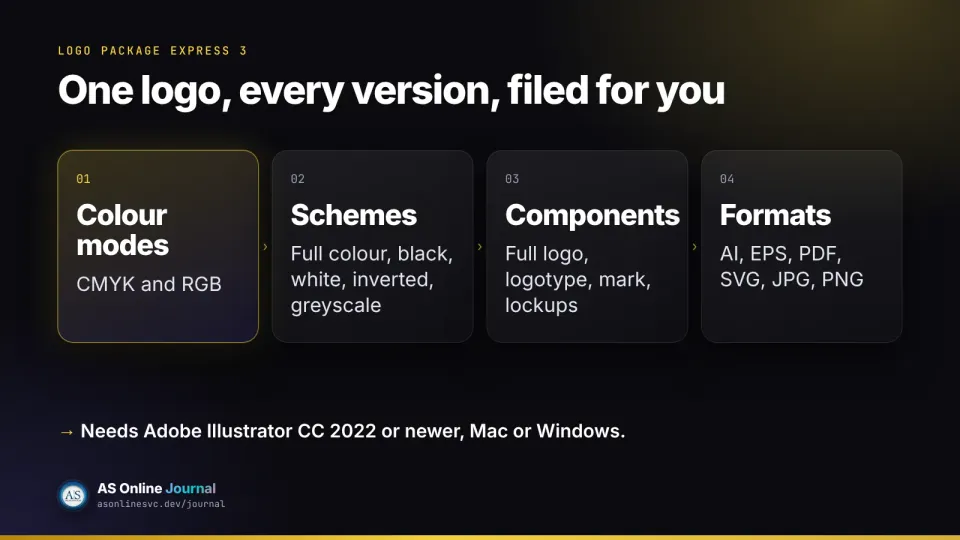
Anyone who has delivered a logo knows the dull part. The client needs a full-colour version, black, white, inverted and greyscale; in CMYK for print and RGB for screens; as AI, EPS, PDF, SVG, PNG and JPG; for the full logo, the wordmark and the symbol on its own. Multiply those together and you quickly reach dozens or hundreds of files, each of which has to be named sensibly and filed where the client can find it. Doing that by hand is slow and easy to get wrong.
According to the product page, checked on 23 November 2026:
The seller says it can produce more than 200 files in under five minutes. That is the seller's claim, which we have not measured.
The Gumroad page showed 4.9 out of 5 from 120 ratings, with 93% five stars and 3% one star, and 6,156 sales. Those are buyers' ratings on the seller's page. The small share of one-star ratings is worth noting: as with any plug-in, check the version requirement against your setup before you buy.
You do not need an extension to batch-export. Illustrator's Export for Screens and Asset Export panel, described in Adobe's help pages, let you export artboards and assets in several formats and sizes at once. What they do not do is create the colour variations for you. You still build each black, white, inverted and greyscale version by hand, and set up the naming yourself.
So the honest comparison is:
| Illustrator's own tools | Logo Package Express 3 | |
|---|---|---|
| Cost | Included with Illustrator | $149 one-off, plus Illustrator |
| Exports several formats at once | Yes | Yes |
| Creates colour variations for you | No | Yes |
| CMYK and RGB versions automatically | No, set up by hand | Yes |
| Consistent file names and folders | Partly, with care | Yes, customisable |
For a working designer, the maths is simple: if it saves a couple of hours per package, it pays back quickly, and the buyers' ratings are very strong. For a beginner, it is too early. Learn the free tools, deliver a few packages by hand, then come back to it.
If it fits your work, you can get Logo Package Express 3 on Gumroad. Check the current price and Illustrator version requirement before you pay.
On 23 November 2026 the Gumroad page listed it at $149, shown as £113.89 for a UK buyer. The final amount can change with exchange rates and any tax at checkout.
The product page says it requires Adobe Illustrator CC 2022 or newer, on Mac or Windows. It is an Illustrator extension, so you need an active Illustrator subscription.
Usually not yet. It saves time on repetitive exports, so it pays off when you deliver logo packages regularly. If you make one or two logos a year, Illustrator's built-in Export for Screens and Asset Export tools are enough.
No. This review is based on the public product page and ratings checked on 23 November 2026, and Adobe's own documentation. We have not installed the extension.