A realistic 30-day plan for using AI in a UK small business
One small task a day, a written data rule on day three, and no new subscriptions until you know you need one.
By AS Online Journal · 7 min read Published · Updated
In short
You do not need an AI strategy to run a small business. You need a month of small, boring, well-chosen practice. This plan gives you one 15–45 minute task a day, puts a written rule about customer data in place on day three, and leaves buying decisions until the end. By day 30 you will know where an assistant helps you and where it does not.
Why a month, and why one task a day
Most small-business owners try AI in one of two ways. Either they paste in a big job on a busy evening and get something unusable, or they sign up for three tools at once and use none of them properly.
A month of short daily tasks avoids both. Each task is small enough to finish, real enough to matter, and low-risk enough that a bad draft costs nothing. You also build a set of notes, templates and rules you keep afterwards.
If you would like the full day-by-day version with checklists, we publish our own AS Online product, AI for Small Business: 30-Day Starter Plan, for £14. The outline below is free to use as it is.
Before day one: use what you already have
Check what you already pay for before you buy anything. At the time of writing, Microsoft's UK pages say Microsoft 365 Personal and Family include Copilot in Word, Excel, PowerPoint and Outlook for the subscription owner, and Microsoft lists business plans with Copilot built in. Microsoft also says Copilot Chat is included at no extra cost with eligible Microsoft 365 business plans. OpenAI's pricing page lists a free ChatGPT plan alongside paid Go, Plus, Pro, Business and Enterprise plans.
Pick one assistant for the month, ideally the one already inside the apps you use. Switching tools mid-month mostly teaches you about switching tools.
This plan is probably not for you if your business already has an IT or data policy that covers AI (follow that instead), or if most of your work involves health, legal or financial records about clients. In that case, take advice before any client information goes near an assistant.
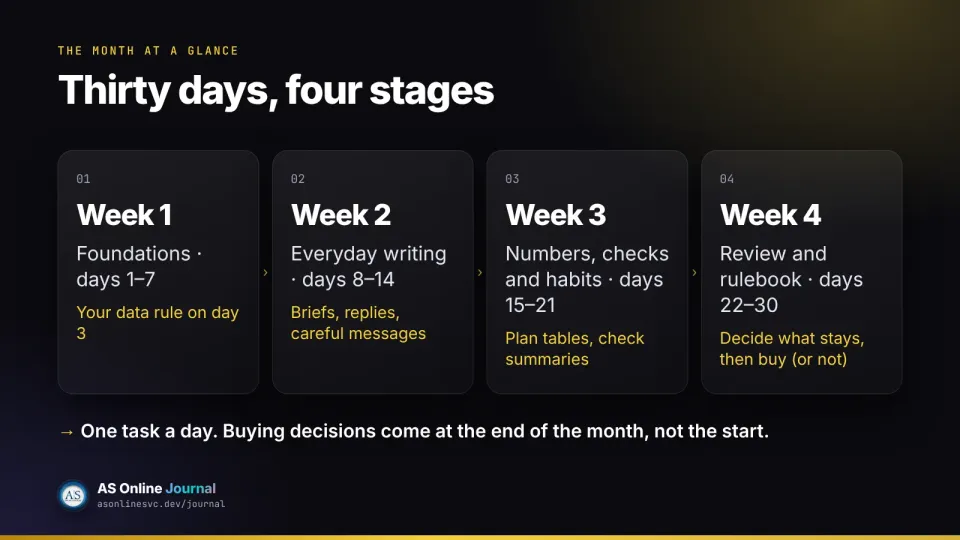
Week 1: foundations (days 1–7)
This week is about deciding what to use AI for, and what never to give it.
Comparison at a glance
Day
Task
Done when
1
List the work you did in the last five working days. Circle the three jobs that cause the most friction.
You have one sentence: "In 30 days I want [this] to be easier."
2
Write down the tools you already have, and which (if any) are approved for business data.
You know which tool you will practise with.
3
Write your data rule: what must never go into a personal assistant.
It is printed or pinned where you work.
4
Choose your one assistant and where you will use it (browser, app, or inside Word or Outlook).
Decided, and no new plan bought.
5
Read the privacy settings of that tool.
You know what your setting is, and why.
6
Write a six-to-ten line "house style" note: British English, short sentences, banned words.
Saved as a note you can paste.
7
Review the week.
One thing to keep, one to simplify.
Day 3 is the most important day
Under UK GDPR, the ICO defines personal data as information relating to an identified or identifiable living person, which covers customer names, contact details and order histories, and staff records. A name with a work email address counts too. The ICO also publishes guidance on AI and data protection that applies to private-sector businesses. When we checked, the ICO marked parts of its guidance as under review following the Data (Use and Access) Act 2025, so read the live pages rather than a summary. This is general information, not legal or data-protection advice. The NCSC is blunter: do not include sensitive information in queries to public AI tools, and do not ask anything that would cause problems if it were made public.
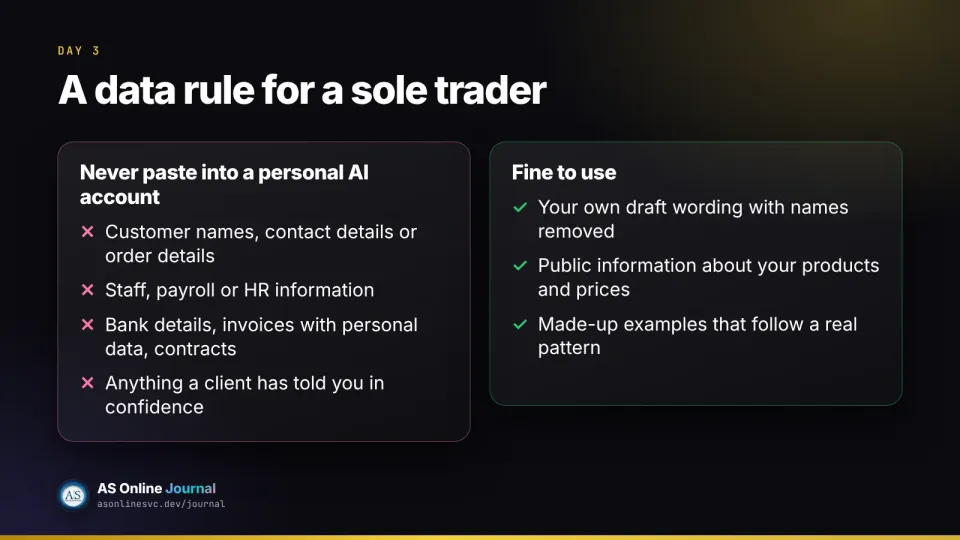
A workable day-three rule for a sole trader might read:
Never paste into a personal AI account:
- customer names, contact details or order details
- staff, payroll or HR information
- bank details, invoices with personal data, contracts
- anything a client has told me in confidence

Fine to use:
- my own draft wording with names removed
- public information about my products and prices
- made-up examples that follow a real pattern
Day 5: know your setting
If you use a personal ChatGPT account, OpenAI says "Improve the model for everyone" is on by default for Free, Plus and Pro, and can be turned off under Settings, then Data controls. OpenAI also says Business and Enterprise workspaces are not used for training by default. Whatever tool you use, find the equivalent setting and write down what it is.
Week 2: everyday writing (days 8–14)
Now the assistant starts earning its keep, on writing you would have done anyway.
Day 8: write a fill-in-the-blank brief for emails: audience, purpose, facts, things not to mention, tone, length.
Day 9: take an email you have already sent and ask the assistant to tighten it using your house style, without adding facts. Keep only the changes that really are clearer.
Day 10: a careful message. Write the decision yourself first, then ask the tool only to tidy the wording.
Day 11: turn one common customer question into a reusable reply, with blanks for names and dates.
Day 12: outline a short document before drafting it.
Day 13: meeting prep and follow-up, extracting decisions and actions without inventing owners.
Day 14: review. Would you still send this week's drafts?
A day-11 prompt might look like this:
Here is my accurate answer to a question customers often ask:
[your answer, with any exceptions]

Turn it into a short, friendly reply in British English,
under 100 words, with [NAME] and [DATE] as blanks.
Do not add any promise, discount or policy I have not written.
Keep the result as a saved reply you edit each time. It is a draft, not an auto-send.
Week 3: numbers, checks and habits (days 15–21)
Week three moves to tables, summaries and the habit of checking.
Plan a spreadsheet before building it. Ask the assistant to suggest columns for a question you need answered, and to warn you if your data cannot answer it.
Summarise a public document or a non-confidential report, asking it to separate "the document says" from "this is unclear". Then check two figures against the original.
Prepare a two-minute spoken update from notes you already have.
Do not paste a sensitive ledger or customer list into a personal tool for any of this. Copilot in Excel, for what it is worth, needs the file saved to OneDrive with AutoSave on, according to Microsoft's UK plan page.
Week 4: review and your one-page rulebook (days 22–30)
The last stretch is about deciding what stays. By now you have a house style, a data rule, an email brief and a few saved replies.
Spend these days repeating the tasks that helped, dropping the ones that did not, and writing a one-page rulebook covering:
the jobs you will use an assistant for
the jobs you will not
your data rule, unchanged or tightened
the checks every draft gets before it goes out
whether you need a paid plan, and which one, after reading the official pricing page
That last point is deliberate. Buying decisions come at the end of the month, when you have evidence from your own work, not at the start.
A product from AS Online
This article is paired with our own product, AI for Small Business: 30-Day Starter Plan, at £14. It is not a third-party offer and it does not include a software login.
It is a day-by-day PDF and EPUB for UK sole traders and small-business owners. Each of the 30 days has a short purpose, a 15–45 minute task, a "done when" checklist and a note on what not to paste into a personal assistant. It ends with a one-page rulebook. It is not access to ChatGPT or Copilot, and it does not promise more sales or income.
Do I need to buy ChatGPT or Copilot to follow this plan?
No. Start with whatever you already have, including a free plan or the Copilot that comes with an existing Microsoft 365 subscription. Only pay for more once you know what you need, and check the official pricing page first.
Can I paste customer details into an AI assistant?
Not into a personal consumer account. Customer details are usually personal data under UK GDPR, and the NCSC advises against putting sensitive information into public AI tools. Write a rule about it before you start.
Will this bring in more sales?
This plan makes no promise about sales or income. It is a structured month of practice so you can judge for yourself where an assistant helps and where it does not.