GuidesPractical guide

7 min readNew
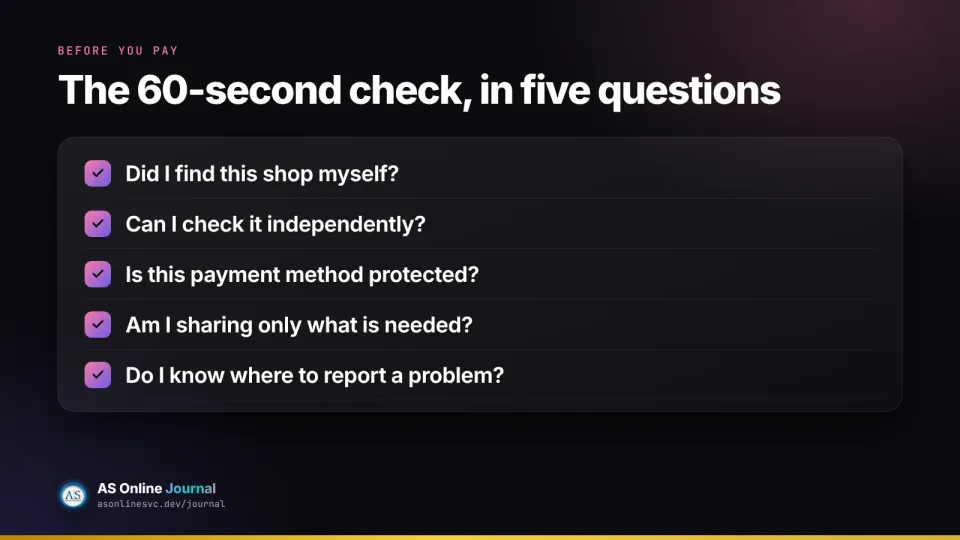
Five questions, drawn from the National Cyber Security Centre's shopping guidance, that take about a minute and catch most fake shops, fake links and risky ways to pay.
Most online shopping scams work by hurrying you past a few simple questions. The National Cyber Security Centre (NCSC) updated its shopping and paying safely online guidance on 24 November 2026, and its advice boils down to a check you can do in about a minute: where did the link come from, is the shop real, how am I paying, what am I being asked for, and where do I report a problem. This guide turns that into five questions. It is general safety information, not legal or financial advice.
The NCSC says to find the shop's website yourself rather than relying on a link you have been sent. Type the address into your browser if you know it, or search for the shop and take care to pick the right result. Criminals, it says, use emails, text messages, social media posts and online adverts to send people to fake shops that "may look genuine".
If you arrived through an advert or a message promising a bargain, stop and look the shop up separately. If something does not feel right, the NCSC's advice is simply: don't click the link.
For a shop you have not used before, the NCSC suggests researching it using well-known consumer websites or reviews from people or organisations you trust. It also links to advice from Which? on spotting fake reviews, which can help you spot fake shops.
A useful test is whether you can find independent comment on the shop outside its own pages. A shop with no history and only glowing reviews on its own site tells you very little.
The NCSC's guidance on payment methods is specific:
Protection depends on the details of your purchase and your provider, so treat this as a starting point and check your own card terms.
The NCSC says to provide only what is needed to complete the purchase, such as a delivery address, and to check out as a guest if you can, which avoids creating another account to look after. It suggests using your browser, device or a reputable password manager to save payment details rather than saving them with individual shops. If you do have an account, it recommends the strongest sign-in method available, with passkeys where offered, or otherwise a strong, unique password and two-step verification.
Decide this before you need it. The NCSC lists these routes:
Contact your bank through its official app, website or phone number, not through details in a message. Report Fraud is the national reporting service for fraud and cyber crime, run by the City of London Police, and its FAQ says Police Scotland has not signed up to it, so people in Scotland should report to Police Scotland directly on 101.
The NCSC's guide to spotting scams lists five tell-tale signs: authority, urgency, emotion, scarcity and current events. Black Friday uses at least two of them for legitimate reasons. Real sellers do run time-limited offers, so a countdown on its own does not make a shop fake. The sign to watch for is pressure combined with something else on the list, such as an unfamiliar sender or a request to pay in an unusual way.
It adds that scams used to be easier to spot by bad spelling or odd design, but "scams are getting smarter and some even fool the experts". So a polished page proves little.
NCSC's blog says QR codes in pubs and restaurants are probably safe to scan, scanning in open spaces such as stations and car parks might be riskier, and a QR code in an email deserves caution because criminals use them in phishing emails to disguise links. It recommends the scanner built into your phone rather than a downloaded app. After scanning, check the address you land on before you type anything.
We make a printable version of this check. The Festive Scam Check Cards (£3) are six A4 cards and eight wallet-sized cards covering the warning signs, a step-by-step guide for suspicious messages, QR code checks, a script for calls about money, safer shopping and what to do if it has already happened. It also has a family page and a sources page. It is our own product, built from the NCSC, Ofcom and Report Fraud pages, and it is general safety information, not legal or financial advice. See the Festive Scam Check Cards on Gumroad. Everything in this article is free, and the official pages above cover the same ground.
Facts in this article were checked against the sources listed below on 26 November 2026. Services, numbers and guidance can change, so check the official pages for the latest.
The NCSC says a credit card may give extra protection under Section 75 of the Consumer Credit Act for a single item costing more than £100 and up to £30,000. Debit card payments offer less protection, though a voluntary scheme called chargeback may allow a refund claim. Rules and limits vary, so check with your card provider.
The NCSC says to forward suspicious emails to report@phishing.gov.uk, forward suspicious texts to 7726 (free), report suspicious websites to the NCSC, and report scam adverts to the Advertising Standards Authority.
The NCSC says to tell your bank and report it as a crime to Report Fraud if you are in England, Wales or Northern Ireland, or to Police Scotland if you are in Scotland. Contact your bank through the official app, website or phone number, not through a link or number you were sent.