GuidesPractical guide

5 min readNew
From 'it works on my machine' to a flood of security alerts: the usual symptoms, what is normally behind them, and the safest next step for each.
Most dependency problems come down to one of four things: something changed that you did not notice, the install is not reproducible, a version jump was bigger than it looked, or a security fix is waiting. Ask four questions in order, use the table below to match the symptom, and make the smallest change that fixes it on a branch with tests. Examples use npm, pip and GitHub's Dependabot, but the logic works for any package manager.
Prerequisites: access to the project's repository, the ability to run its install and tests locally, and ten quiet minutes before you change anything.
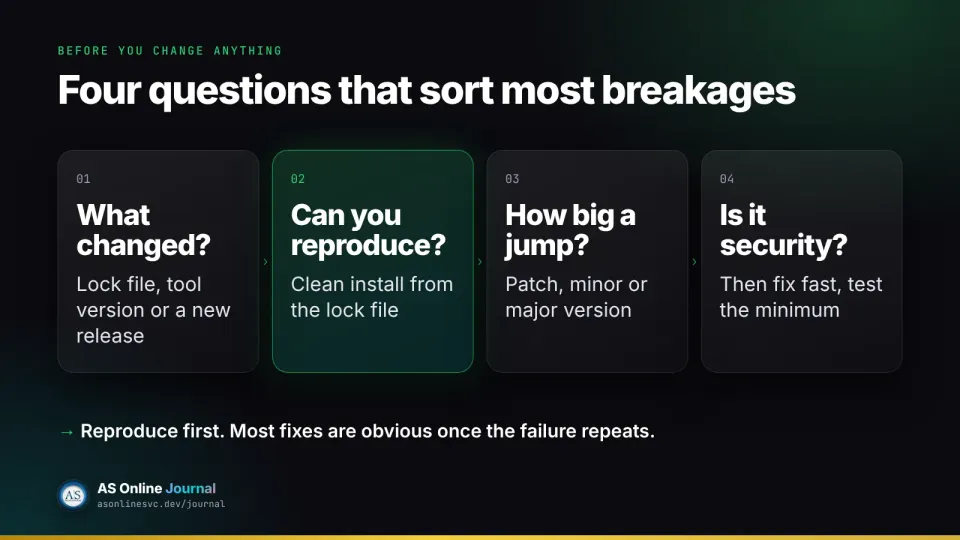
1. What changed? Look at the last commits to the lock file, any change to the language or tool version (Node, Python, the package manager itself), and whether a dependency published a new release. "Nothing changed" is rarely true; often the change was in the environment, not the code.
2. Can you reproduce it from a clean install? Delete the installed packages and install exactly what the lock file says. In npm that is npm ci. Its documentation says it needs an existing lock file, stops with an error if the lock file and package.json disagree, removes any existing node_modules first and never writes to the lock file. That makes it a fair test of what CI will see.
3. How big is the version jump? Semantic Versioning says a MAJOR increase signals incompatible API changes, a MINOR one adds backward-compatible features, and a PATCH one is a backward-compatible bug fix. It is a promise by the maintainer, not a guarantee, but it tells you where to expect breakage: read the changelog for every major jump.
4. Is it a security fix? If yes, speed matters more than tidiness. Apply the smallest version that contains the fix, test, ship, and leave wider upgrades for later.
| Symptom | Usual cause | Safest next step |
|---|---|---|
| Works on your machine, fails in CI | Lock file not committed or out of date, or a different tool version in CI | Commit the lock file; use the clean install (npm ci); pin the runtime version in CI to match |
| Fails after a fresh install, nothing in the code changed | A dependency released a new version within the range you allow | Install from the lock file; if you must update, update one package at a time |
npm ci errors that the lock file does not match |
Someone edited package.json without updating the lock |
Run the normal install once, review the lock file change, commit both together |
| Build breaks after an update | A major version jump with breaking changes | Read the changelog; pin the previous major for now; plan the migration as its own task |
| A flood of security alerts | Many alerts point at the same transitive dependency | Fix the shared root first; one update often closes several alerts |
| An alert has no fix available | The maintainer has not released a patch yet | Check whether your code uses the vulnerable feature; record the decision and a review date |
npm audit fix --force wants a new major version |
The only fixed release is a breaking one | Do not force it blindly; apply on a branch and run tests, as npm notes some issues need manual review |
| A package looks abandoned | No releases or replies for a long time | Look for a maintained fork or alternative; check its security record before switching |
| Python install pulls different files on different days | No pinned versions or hashes | Pin versions; consider pip's hash-checking mode for deployments |
Here is a typical case (an illustration, not a real incident). A small website builds fine on the developer's laptop but fails in CI with an error from a date-formatting library.
package-lock.json was never committed.^ range, which has a new minor version with a change the site trips over.npm ci, and open a separate task to adapt the code to the new release.The bug was real, but the problem the team actually had was an unreproducible build. Fixing that stops the next surprise too.
npm audit asks your registry for a report of known vulnerabilities in your dependency tree, as its documentation explains.Commit the lock file, install from it everywhere, and update a little at a time on a regular schedule. It is dull, and it is what keeps a project healthy for years.
Tool behaviour checked against official documentation on 24 November 2026. Commands differ between package managers and versions.
For applications, yes. A lock file such as package-lock.json records the exact versions that were installed, so a clean install on another machine or in CI gets the same tree. npm's own documentation says npm ci requires an existing lock file and stops with an error if it does not match package.json.
Treat it with care. npm's documentation notes that some vulnerabilities cannot be fixed automatically, and forcing a fix can install a new major version with breaking changes. Read what it proposes, apply it on a branch and run your tests first.
Little and often is usually easier than rare big jumps. Tools such as Dependabot version updates can open regular pull requests on a schedule you choose, so each change stays small enough to review.
open-source dependencies software-maintenance security guide