GuidesPractical guide

5 min readNew

Why key rotations cause outages, the overlap pattern that avoids them, and what to check when something still goes wrong.
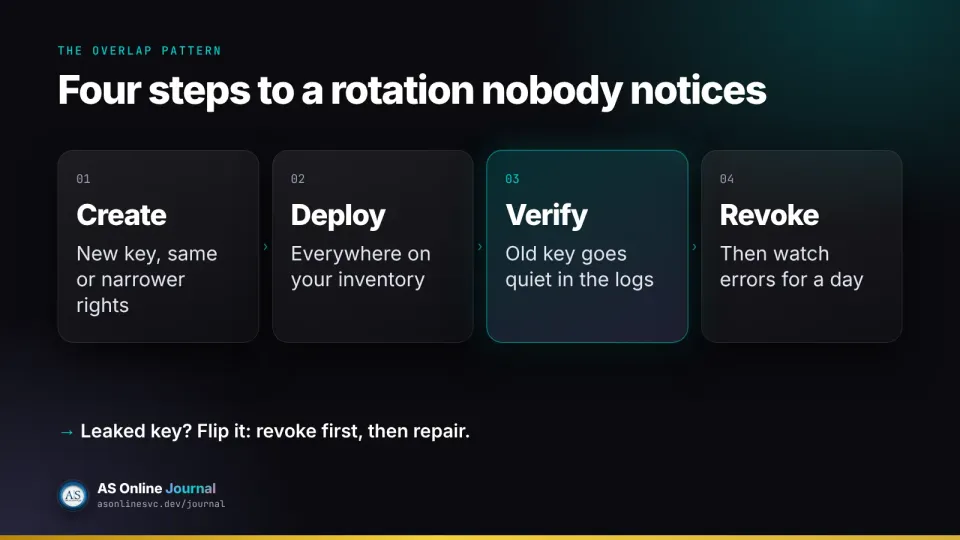
Most key rotations break things for one reason: the old key is switched off before everything that uses it has moved to the new one. The fix is an overlap. Create the new key, deploy it everywhere, prove it is in use, and only then revoke the old key. If a key has leaked, the order flips: revoke first, then repair. The table below maps the common symptoms to their usual causes.
An API key is a password for software. Rotating it means replacing it with a new one and retiring the old one, so that a key which has been copied, logged or forgotten stops being useful. OWASP's Secrets Management Cheat Sheet treats rotation, revocation and expiry as normal stages in a secret's life, not as emergencies.
The hard part is not making the new key. It is finding every place the old one lives: the production server, a background job, a staging copy, a colleague's laptop, a CI pipeline, a mobile app build, a no-code automation someone set up two years ago. Miss one and it fails the moment the old key stops working.
Many providers are designed for this. AWS's IAM documentation says a user can hold a maximum of two access keys at once, which is exactly what an overlap needs. Microsoft documents a rotation pattern for resources with two sets of credentials. Stripe's key guidance suggests creating a new key, migrating to it, and expiring the old one when you are done, rolling out gradually and watching logs for errors.
| What you see | Most likely cause | What to check | Fix |
|---|---|---|---|
| 401 Unauthorized straight after revoking | A system still has the old key | The provider's last-used data for the old key, and your logs for the failing service | Deploy the new key there; if needed, re-enable the old key while you do |
| Works on one server, fails on another | Config not updated everywhere, or a cached value | Each server's environment, and whether the app reads secrets only at start-up | Update and restart the remaining instances |
| A nightly or weekly job fails days later | A rarely run task was missed | Scheduled jobs, CI pipelines and automations | Add them to the inventory; extend the overlap past their run interval |
| 403 Forbidden with the new key | The new key has fewer permissions or the wrong restrictions | Compare scopes, IP or referrer restrictions and environment (test or live) | Correct the permissions rather than widening them blindly |
| A mobile or desktop app breaks for some users | The key is built into the app and old versions are still installed | App version analytics | Move the key behind your own server; give old versions a longer overlap |
| The old key is still being used after a week | An unknown copy exists | The source IP or user agent in the provider's logs | Find it before revoking; it may be a forgotten system or a misuse |
If a key has been pushed to a public repository, pasted into a chat, or appears in a log someone outside the team can read, treat it as exposed. GitHub's secret scanning exists because this happens so often, and deleting the commit afterwards does not make the key safe.
.env file, a debug log, a screenshot.Providers differ. Some allow only one active key, so an overlap is impossible and you need a short maintenance window instead. Some keys cannot be restricted. Check your provider's own documentation before a planned rotation, and do it at a quiet time with someone available to roll back.
There is no single right interval. Google Cloud's guidance is to rotate API keys periodically, and OWASP recommends automating rotation where you can. Many teams pick a fixed schedule such as every 90 days for long-lived keys, plus an immediate rotation whenever a key may have been exposed or someone with access leaves.
Only in an emergency. In a planned rotation, keep the old key working until every system is confirmed to be using the new one, then revoke it. If the key has leaked, revoke first and accept a short outage, because an attacker may already be using it.
No. Once a key has been pushed it should be treated as exposed, even if you rewrite history. Revoke it with the provider and issue a new one.