GuidesPractical guide
5 min readNew
Your web address and email depend on a registrar account most people log into once a year. How domains get lost or hijacked, the checks that prevent it, and what to do when records look wrong.
Your website and email both depend on two accounts: the registrar where you rent the domain name, and the DNS host where its records live (often the same company). Lose control of either and someone else can point your web address or your email wherever they like. Most problems are preventable with four habits: auto-renewal on a card the organisation owns, multi-factor sign-in on the registrar account, a registrar lock on important domains, and a regular look at your DNS records. The table below covers what to do when something looks wrong.
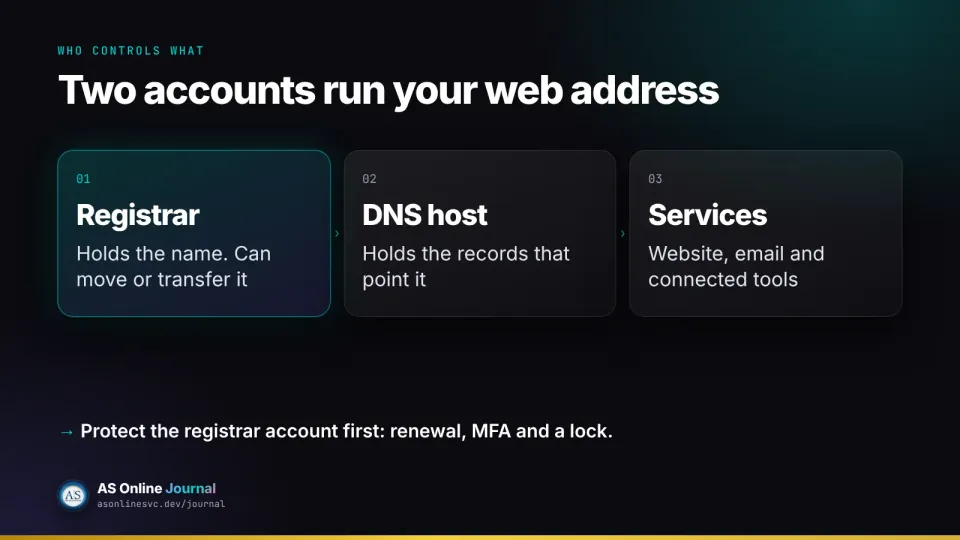
A or CNAME record sends visitors to your website; MX records send your email to the right provider; TXT records carry email security settings such as SPF and DMARC.If a small organisation has one weak link, it is usually the registrar account: registered years ago by someone who has since left, protected by an old password and a personal email address.
shop.example.co.uk still points to a cloud service you cancelled, someone else may be able to claim that service and serve their content on your subdomain. MDN calls this a subdomain takeover.Do this once, then put a reminder in for every six months.
| What you see | Most likely cause | What to do |
|---|---|---|
| Website shows a "this domain is for sale" or registrar holding page | The domain has expired | Renew immediately from the registrar account; many registrars allow a grace period, but do not rely on it |
| Website or email suddenly goes somewhere else | DNS records or name servers changed, legitimately by mistake or by an attacker | Compare with your saved records; check the registrar's activity log; change passwords and confirm multi-factor is on |
| Email stops arriving after a website move | MX records were lost when DNS moved to the new host |
Copy the email provider's MX and TXT records into the new DNS host |
| Customers receive fake emails "from" you | No DMARC policy, or one set to monitor only | Set up SPF and DKIM, then move DMARC from "none" towards "quarantine" or "reject" as reports show your real mail passes |
| A subdomain shows content you do not recognise | A record still points to a cancelled service | Remove or update the record straight away, then check others like it |
| You cannot log in to the registrar | The account is tied to a former colleague or an old email address | Contact the registrar's support with proof of ownership; this can take time, so start now |
| A transfer request you did not make | Someone is trying to move your domain | Refuse it at the registrar, check the lock is on, and secure the account. ICANN's Transfer Policy sets the rules registrars follow |
DNS changes can take time to spread, so a fix may not show everywhere immediately, and a hasty change can break email as easily as it fixes the website. Change one thing at a time, keep a record of what you changed, and if your domains matter to your income, make sure at least two trusted people can get into the registrar account.
The NCSC warns that after a domain's expiry date, administrative access becomes unavailable and another organisation could register it. Set it to auto-renew with a payment method the organisation actively maintains, not a personal card that will expire.
A setting many registrars offer that stops a domain being changed or transferred until the lock is removed. The NCSC suggests assessing lock services, particularly for high-value domains; some cost extra.
DNSSEC adds digital signatures to DNS answers so resolvers can detect tampering. ICANN explains how it works. It is worth enabling if your registrar and DNS host support it well, but it does not replace account security, renewals or monitoring.