GuidesPractical guide
5 min readNew
The forgot-password page is often the weakest door into an account. What a safe reset flow looks like, the mistakes that give accounts away, and how to fix the complaints users send in.
A password reset is a second way into every account, and attackers know it. A good one tells nobody whether an account exists, sends a link that works once and expires quickly, never relies on security questions, and tells the user when their password has changed. Get those right and most of the support tickets that remain are about email delivery and expired links, which the table below helps you fix.
Your login page may have rate limits, multi-factor checks and careful monitoring. If the forgot-password page will hand out a working link to anyone who can guess an answer or intercept an email, none of that matters. OWASP's 2017 Top 10 listed weak or ineffective credential recovery, such as knowledge-based answers "which cannot be made safe", as part of broken authentication.
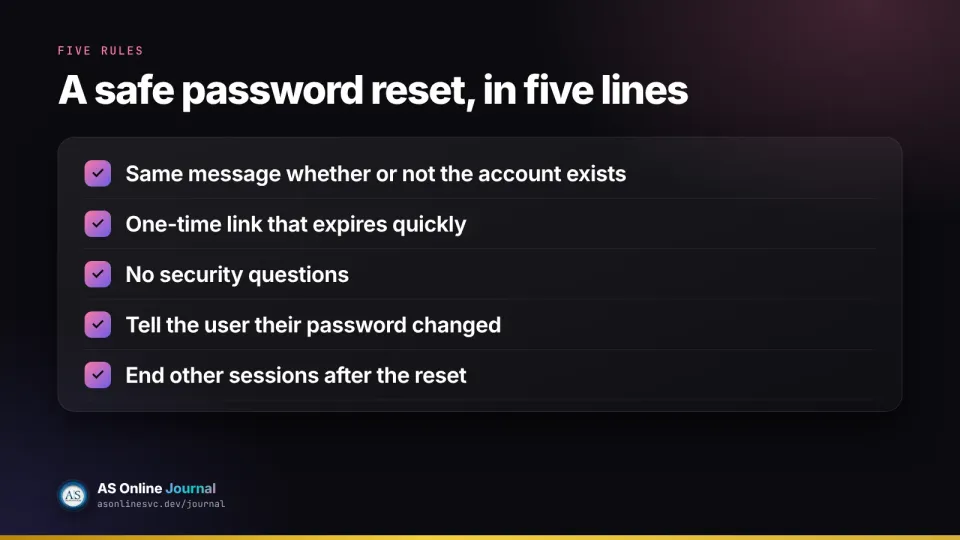
OWASP's Forgot Password Cheat Sheet recommends returning a consistent message for both existent and non-existent accounts, and making the response time uniform. "If an account exists for that address, we've sent a link" is enough. Otherwise the page becomes a free tool for checking who is a customer.
Reset tokens should be generated with a cryptographically secure random generator, be long enough to resist guessing, be stored securely, and be single use and expire after an appropriate period. Do not change the account, for example by locking it, until a valid token is presented, or anyone can lock your users out by requesting resets.
NIST's authentication guidelines say services shall not prompt users to use knowledge-based authentication, such as "What was the name of your first pet?". The answers are often public on social media, guessable, or forgotten by the user. If you need a second check, send a code to a verified phone or use the user's existing multi-factor method.
When a password changes, email the account holder straight away, including how to get help if it was not them. It costs nothing and is often the first sign of a takeover.
After a reset, sign the account out elsewhere, or at least offer to. OWASP's Session Management Cheat Sheet stresses invalidating sessions on the server. If an attacker was signed in, the reset should throw them out.
These are small, but OWASP's cheat sheet calls each one out:
| What users report | Most likely cause | What to fix |
|---|---|---|
| "The email never arrived" | Spam filtering, a typo in the address, or missing SPF, DKIM and DMARC for your sending domain | Send from a domain with proper email authentication, tell users to check spam, and show the address you sent to (only after sign-in, or masked) |
| "The link says it has expired" | Expiry too short, or the email arrived late | Lengthen the window slightly, show a clear "send a new link" button, and do not make users start from scratch |
| "The link doesn't work" on a work email | A security scanner opened the link first and used up the single-use token | Make the link open a page with a button to confirm, so the token is only spent on a real click |
| "I reset it, but I'm still signed in on my old laptop" | Other sessions were not ended | End other sessions on reset, or show an option to do so |
| "Someone reset my password" | The account email was compromised, or the reset flow has a flaw | Check logs for the reset, confirm the user's email security, review the five rules above |
| "It keeps asking for my first pet's name" | Legacy security questions still enabled | Retire them and move users to verified email, phone or multi-factor methods |
| Floods of reset emails to one user | No rate limiting | Limit requests per account and per IP, and add a challenge after repeated attempts |
The two classic mistakes are opposites. One makes recovery so strict that real users get locked out and flood support. The other makes it so easy that it becomes the attacker's preferred route. Test your own flow every few months as a user would: request a reset from a phone, from a work email, and with a mistyped address, and see what happens each time.
No. OWASP recommends returning the same message whether or not the account exists, and keeping the response time uniform, so the page cannot be used to find out who has an account.
No. NIST's digital identity guidelines say verifiers shall not prompt users to use knowledge-based authentication such as 'What was the name of your first pet?', and OWASP lists knowledge-based answers among weak recovery processes. Answers are often guessable or findable online.
OWASP says reset tokens should be single use and expire after an appropriate period. Many services choose somewhere between 15 minutes and an hour; shorter is safer, as long as real users can still complete it.