GuidesPractical guide
5 min readNew
Why some sign-in methods stop phishing and others do not, how to set up passkeys without locking yourself out, and what to check when they misbehave.
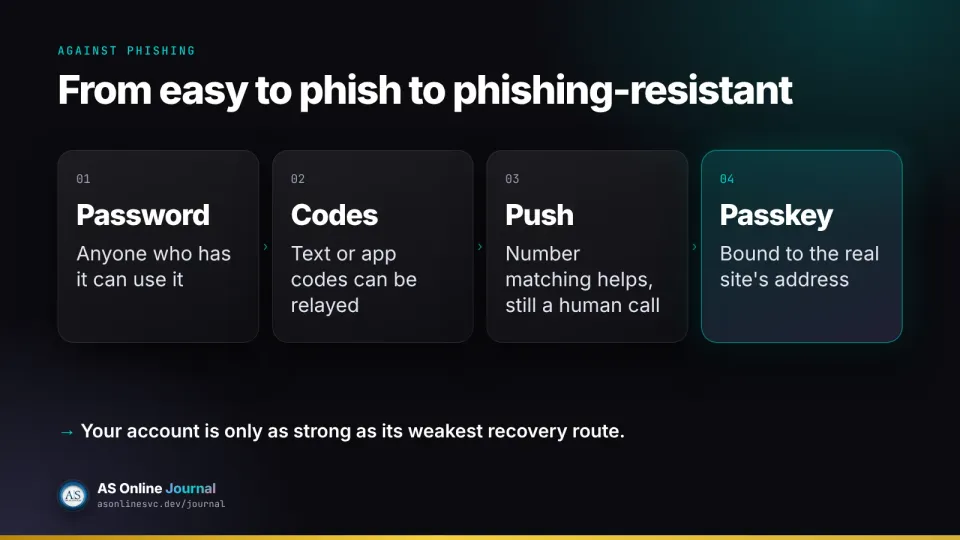
Most two-step sign-in methods still rely on you to spot a fake website. If you type a code from a text message into a convincing copy of your bank's login page, an attacker can pass it straight on. Passkeys and hardware security keys are different: they are bound to the real site's address, so they simply will not work on a fake one. Set them up on your most important accounts first, keep a second way back in that is not weaker than the first, and use the table below when something goes wrong.
US cyber agency CISA's fact sheet on phishing-resistant MFA makes the point bluntly: not all forms of multi-factor authentication are equally secure. Some are vulnerable to phishing, and push approvals can be abused through "push bombing", where an attacker sends request after request until a tired person taps Approve.
The difference comes down to one question: does the method know which website it is talking to?
Google, Apple and Microsoft each publish set-up help: Google, Apple and, for work accounts, Microsoft Entra.
An account is only as strong as the easiest way into it. If you add a passkey but leave "send a code to my phone" as a fallback, an attacker can simply choose the fallback.
The NCSC's blog on passkeys points out that synced passkeys make recovery easier than many older second factors, but that this relies on the user having prepared their credential manager account for recovery. In practice:
| What you see | Most likely cause | What to do |
|---|---|---|
| No "use a passkey" option | The service or your browser does not support it yet, or it is switched off for your work account | Check the service's security settings; for work accounts, ask IT whether passkeys are enabled |
| Passkey works on your phone but not your laptop | The passkey is device-bound, or the laptop uses a different credential manager | Sign in with the phone using the QR code option, then add a passkey on the laptop too |
| QR code sign-in stalls | Phone and computer cannot connect locally: Bluetooth is off on one of them | Turn on Bluetooth on both, keep them close, and try again |
| "This passkey is not for this site" or no passkey offered | You may be on the wrong address | Stop and check the address bar. This is the protection working |
| New phone, passkeys gone | They were device-bound, or the new phone is not signed in to the same credential manager | Sign in to the same Apple, Google or password-manager account; otherwise use recovery codes and re-register |
| Two password managers keep offering to save the passkey | Browser and a third-party manager both active | Pick one place to keep passkeys and turn off the other's prompts |
| Security key not recognised | Wrong connector, or the site wants the key's PIN set first | Try another port or tap via NFC; set the key's PIN in your system settings |
| Asked for a text code even though you have a passkey | Fallback still enabled, or a new device or location triggered extra checks | Fine once; if it happens every time, check that the passkey is registered for that account |
Phishing-resistant sign-in protects against fake sites, not against everything. Malware on your own device, a hijacked browser session, or someone who knows your recovery answers can still cause harm. Keep devices updated, be wary of approving anything you did not start, and remember that the strongest lock is wasted if the spare key is under the mat.
It means the sign-in method cannot be tricked into working for a fake website. Passkeys and FIDO security keys are tied to the real site's web address, so even if you are fooled into visiting a lookalike page, the credential will not work there.
Yes, compared with a password alone. But codes by text, email or authenticator app can be typed into a fake site and relayed by an attacker. Where a service offers passkeys or security keys, they are the stronger option.
If they are synced through a credential manager such as iCloud Keychain, Google Password Manager or a third-party password manager, they come back when you sign in to that account on a new device. The NCSC notes this relies on having prepared that account for recovery, so set up its recovery options now.