News & ExplainersExplained
5 min readNew
A passkey has two halves that live in different places. Trace a failure to the half that broke and most passkey problems stop being mysterious.
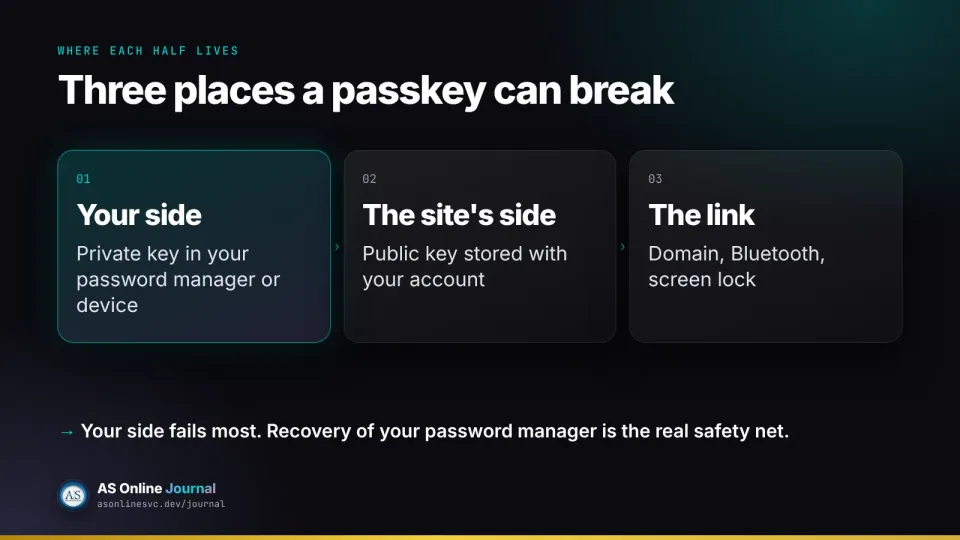
A passkey is a pair of keys. The private half lives with you, in your phone, computer, security key or password manager. The public half lives with the website, attached to your account. When a passkey "fails", one of three things has broken: your half, the website's half, or the link between them. Most everyday failures are on your side, which is why the recovery set-up of your password manager matters more than any single passkey. For a step-by-step fix list, see our passkey troubleshooting map; this piece explains why those fixes work.
Apple's passkey security overview puts it plainly: when you create a passkey, your device makes a unique key pair for that account. The public key is stored on the server and "is not a secret". The private key is what signs you in, and "the server never learns what the private key is".
Two consequences follow, and they explain almost everything below:
What happens next depends on where the private key lived.
The lesson: a synced passkey is only as recoverable as the account that syncs it. If you cannot get back into your Apple, Google or password-manager account, you cannot get your passkeys back either.
Google's passkey help page lists some everyday causes: the device's screen lock is off (no screen lock, no passkey), or a newly created passkey has not been trusted yet. Google says you may need to wait seven days before a new passkey is available at sign-in. Signing in on a computer with your phone's passkey also needs Bluetooth on, because the phone checks it is physically near the computer.
None of these mean the passkey is broken. They mean a condition the system relies on is not met.
Because a passkey is bound to its domain, it will not appear on a look-alike site. If you expect a passkey prompt and none appears, check the address bar before anything else. This is the anti-phishing protection doing its job, and it is the one "failure" you should be glad of.
It can also catch out genuine sites that change domain or sign-in address. That is the website's problem to fix, not yours.
Google notes that if you remove a passkey from your account but are still prompted to use it, it may still be sitting in a third-party password manager. The site has deleted its public half; your manager still holds a private half that now matches nothing. Delete it from the manager too. Apple's 2025 developer guidance describes ways for websites to tell password managers about such changes, so this should become rarer as sites adopt them.
Until recently this was a real lock-in: passkeys could not be exported, so you had to create new ones site by site. That has changed. Apple's WWDC25 session introduced secure import and export of passkeys between participating credential managers in its 26 releases, using a standard data format from the FIDO Alliance. On Android, 9to5Google reported on 10 September 2026 that Google launched a system-level transfer, supported at launch by Google Password Manager, 1Password, Bitwarden and Dashlane. Both the old and new manager have to support it, so check before you rely on it.
Put the five failures together and a pattern appears. The passkey itself rarely fails. What fails is your access to the place it lives, or a condition around it.
So the most useful thing an everyday user can do is not to create more passkeys. It is to make sure the password manager holding them can be recovered: two-factor sign-in on that account, a current phone number, a recovery contact or recovery key where offered, and at least two devices that can sign in.
There is a fair counterargument. Every recovery route is also a way in for an attacker, and some security experts prefer fewer, stronger routes. Google's own page notes that adding a passkey does not remove your existing recovery factors. For most people, being locked out is the more likely harm than a targeted attack on their recovery, so a well-protected recovery route is the right trade. People at higher risk, such as journalists or public figures, should look at stronger options like hardware security keys and their providers' advanced protection programmes.
How smoothly passkey transfer between managers works in practice, across many sites, is still early. The standards exist and the first apps support them; long-term reliability is something to watch rather than assume.
Checked against Apple, Google, W3C and FIDO Alliance sources on 24 November 2026. Settings and support vary by device and service.
No. The website only holds the public half of your passkey, and the private half never leaves your device or password manager. A website can let you sign in another way and create a new passkey, but it cannot recover the old one for you.
Not if they are synced passkeys and you can recover the password manager that holds them. Apple says passkeys in iCloud Keychain are recoverable even if you lose all your devices, through iCloud Keychain recovery. Device-bound passkeys, such as those on a security key, are lost with the device, so keep a second sign-in method.
Increasingly, yes. Apple's 26 releases added secure import and export of passkeys between participating credential managers using a FIDO Alliance data format, and Google announced a system-level transfer on Android in September 2026. Check that both the old and new manager support it.
passkeys account-security password-managers authentication explainer